React Agentic Engineering 2026: The Tools Started Shipping Their Own Instructions
Next.js ships its documentation inside the package. MUI ships an MCP server and four skills. Storybook ships one too, and Playwright ships three test agents. Four teams solved the same problem within twelve months: an agent that rebuilds your stack from memory writes code for a project that does not exist. What your agent can read now, what it still cannot, and what the same year cost in supply-chain risk.
React Agentic Engineering 2026: The Tools Started Shipping Their Own Instructions
The worst code an agent ever wrote for me was correct. Correct for React 18, for the Pages Router, for a version of Material UI two majors behind. It read confidently, it almost compiled, and it described a project that did not exist.
That was not a model failure. The model had nothing but its memory, and its memory is an average over millions of tutorials, most of them written before your package.json.
What changed since then is easy to miss. The tools stopped waiting for better models and made themselves readable instead. Next.js puts its documentation in node_modules. Storybook and MUI each ship an MCP server, and MUI adds four skills in its own repository. Playwright ships three test agents. Four independent teams reached the same conclusion inside twelve months.
One boundary first, because the two subjects run into each other. This is about building interfaces with AI. Building AI into interfaces is a different article. MUI v9 leads with an AI assistant for the Data Grid, an embeddable chat component, and a generative tool called Recipes.8 Those sit on the far side of that line.
What the agent knows before it types a line
Three things load before the first token: the documentation on disk, the project's own rules, and whatever skills you installed.
The documentation lives in the project
Since Next.js started shipping its documentation inside the package, it sits on disk at the matching version. No network call, and no guessing which release the training data has in mind.1
node_modules/next/dist/docs/
01-app
01-getting-startedinstallation, layouts, server and client components
03-api-referenceevery config key, file convention and CLI flag
04-glossary.md
02-pagesPages Router
03-architecture
04-community
Upgrading the package upgrades the documentation with it. The guide cannot go stale while the code stays current.
create-next-app now writes AGENTS.md and CLAUDE.md on its own, pointing at that directory.1 Pass --no-agents-md to skip them.
AGENTS.md has a specification now
The file started as a house convention. It is now an open specification stewarded by the Linux Foundation.3 It has no schema and no tooling, which is probably why it spread. Any agent that reads markdown benefits immediately.
What belongs inside is less obvious than where it goes. After a year of rewriting, mine holds four blocks:
A commands table. Not which scripts exist, but which one to run for what, and why the obvious shortcut is wrong.
The hard rules, short and without justification. Mine: style with sx, every colour through the theme, no dashes in prose.
Where the knowledge lives. One pointer per subject, read before writing rather than after.
What "done" means. Type check, tests, build, and the knowledge bundles brought up to date.
The last block does the most work and goes missing most often. An agent with no acceptance criterion stops as soon as the code looks plausible.
Skills became installable
Vercel turned skills into a package format: npx skills add vercel-labs/agent-skills, with a lockfile and a hash per skill.4 The reference example is react-best-practices. Forty-odd performance rules, ordered by impact rather than alphabetically, with data-fetching waterfalls and bundle size at the top.5 The file is worth reading with no agent in sight.
MUI took a different route. Four skills sit in the Material UI repository, one each for styling, theming, Next.js and Tailwind. Every one is a directory holding AGENTS.md as the full guide, SKILL.md as the entry point, plus metadata. The root AGENTS.md lists them and links to each.7 Any agent already reading AGENTS.md finds them without configuration.
The material-ui-tailwind skill is official and well made. It is also wrong for any project that has ruled Tailwind out. Your project file has to say which rule wins. Hoping the agent works it out does not count.
Where the agent writes
Three vendors solved the same problem here, each in a different shape, and the differences matter more than the similarity.
Storybook ships the component loop
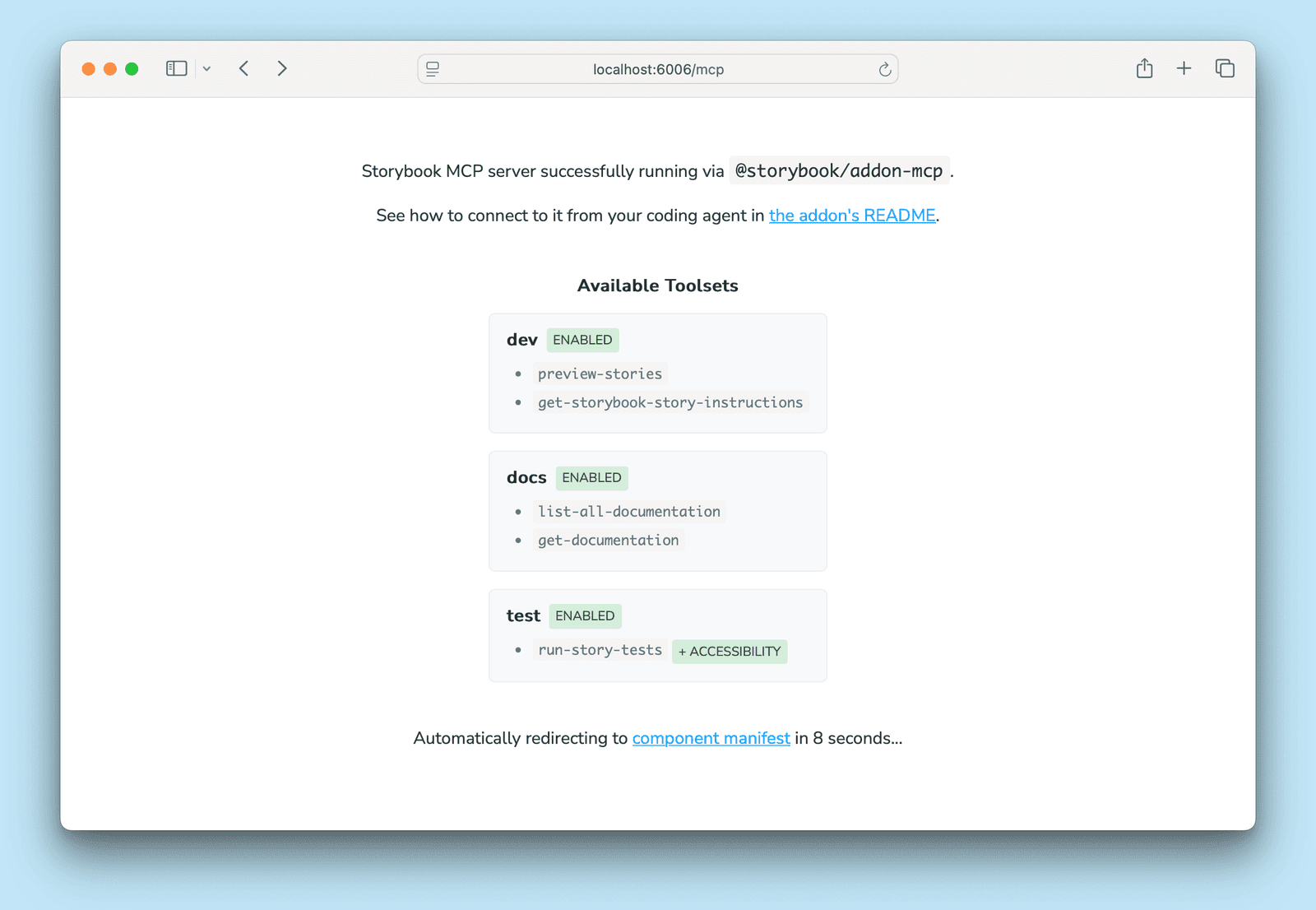
Storybook ships its MCP server as an addon. Register @storybook/addon-mcp and the endpoint runs at localhost:6006/mcp for as long as Storybook does. Open that URL in a browser and it tells you what the agent can reach.9
localhost:6006/mcp lists the toolsets it switched on, and the tools inside each one. Screenshot from the Storybook documentation.
Three toolsets, each switchable in main.ts.10docs reads the component documentation: list-all-documentation, get-documentation, get-documentation-for-story. dev covers the writing side with preview-stories, get-changed-stories and get-storybook-story-instructions. test holds one tool, run-story-tests, and that one closes the loop: generate a story, run it, read the failure, fix it. Preview status, and React projects only so far.
MUI ships its documentation as a tool
MUI publishes @mui/mcp, over stdio, started with npx -y @mui/mcp@latest. useMuiDocs returns a catalogue of URLs and summaries for one or more packages. fetchDocs pulls the full pages. generateReactCode produces React with Material UI from a description, and takes Figma context if you have it.6 The catalogue entries are llms.txt addresses, the format MUI already publishes per product.
That page admits something the others leave out. If the server does not get used automatically, you have to give your client rules that tell it to.6 Shipping a server and getting it used are two different problems. Most vendors here have the second one. MUI writes it down.
Figma ships a catalogue of clients
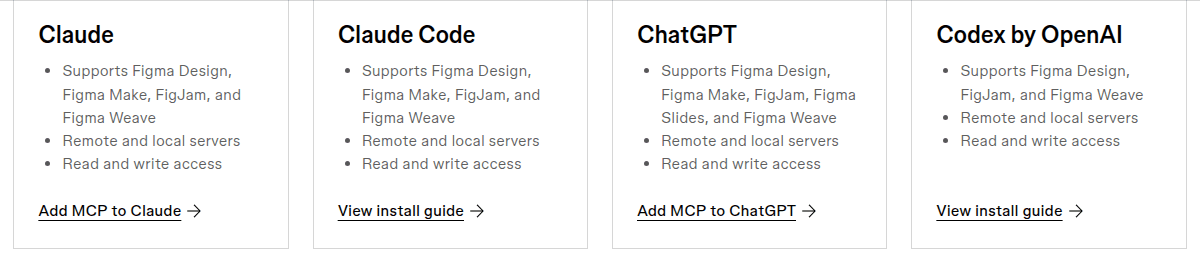
Figma does the same job for design. Components, variables and Code Connect mappings arrive as machine-readable structure, instead of a screenshot the model has to interpret. Figma also solved the adoption problem the other way round. Rather than publish a server and hope, it maintains a catalogue of the clients that reach it. Two dozen entries, each with its own install guide.12
Every entry states which Figma products it reaches, whether the server runs remote or local, and what it may change. Screenshot from figma.com.
Read the third line on each card. Write access lets the agent change the design file itself. Useful, and one more edit that lands without a review step.
Four ways a vendor reaches your agent
Vendors publish that knowledge in four ways, and each one fails differently:
How it ships
Examples
How it fails
Bundled in the package
Next.js docs
never stale, grows big
MCP server
Next.js, MUI, Storybook, Figma, Chrome
the process is down
Skills in the source repo
Vercel, MUI
nobody reads them
Published text file
llms.txt
the agent never learns of it
That is why a list of installed tools says nothing about a setup. An MCP server whose process is down does nothing at all.
Compiles, type-checks, renders, correct
The change here is in what counts as evidence. Why a route is dynamic, why a Suspense boundary breaks the static shell, why a navigation does not commit instantly. An agent used to infer those from source, with the hit rate you would expect. The answer now sits in the documentation next to the code, and in the running application.
People conflate four statements constantly, and each one needs a different tool:
Statement
Answered by
It compiles
the bundler, compile_route without a full build
It type-checks
the type check as its own step
It renders
the running dev server plus a real browser
It is correct
a test describing the intent, or a person
What the dev server can tell you
Next.js serves the first three from one place. The dev server exposes an endpoint at /_next/mcp that a client discovers on its own.2 On 16.3 it carries nine tools. get_errors returns global, build and browser runtime errors with source-mapped stack traces. get_routes groups every entry point by router and shows dynamic segments as [param]. get_logs hands over the dev log path, browser console included.
get_compilation_issues builds the module graph for every route, and it needs no browser session at all.
compile_route is the one worth knowing by name. It runs the same on-demand compilation the dev server would, without an HTTP request:
That is the answer to "does this compile" for one route, in about a second, with no full build and no page load. An agent can run it after every edit.
Type checking moved the same way. The native TypeScript port changed something the tenfold headline buries. A full check that takes seconds instead of minutes stops being a step at the end. It becomes part of every iteration, which matters most to an agent that already works in short cycles.
What only a browser can tell you
The next-dev-loop skill builds on that and adds the browser's view after any change to app code.1 Most setups stop before that. An agent that reads only the MCP response knows that the server found nothing. Whether the page looks right, it does not know.
Three tools cover the browser view, each for a different job. agent-browser opens the page, snapshots the interactive elements, and captures screenshots. Playwright MCP covers multiple browsers and CI. The Chrome DevTools MCP answers the why: Core Web Vitals, network, traces.13
Tests, and the limit of self-healing
Playwright has shipped three agents since 1.56, set up with npx playwright init-agents and a flag for your host.11 The planner explores the running application and writes a test plan in markdown. The generator turns that plan into test files and verifies selectors against the live app. The healer runs the suite and repairs failing tests: replacement selectors, adjusted waits, updated flows.
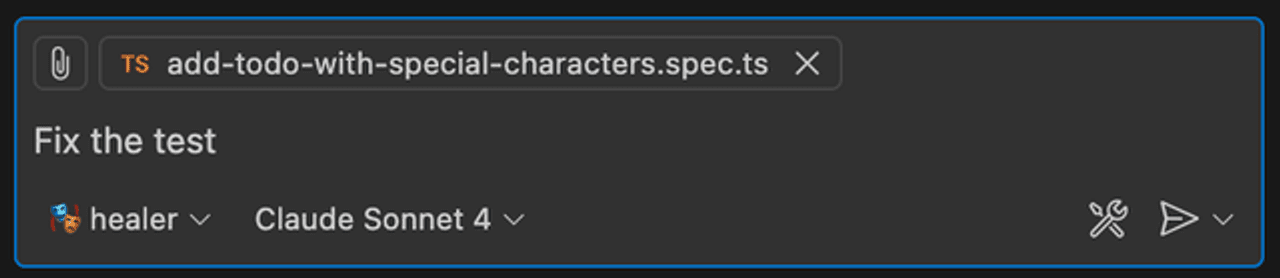
The first two save real time. The third needs a closer look, because invoking it is a one-line prompt:
Attach the failing spec, pick the healer, say fix the test. Screenshot from the Playwright documentation.
A healed test can be a deleted test
Repair a test that fails because a selector changed. Do not repair one that
fails because the behaviour broke. Both look identical from outside: red. An
unattended healer buys green runs and pays with the one statement the tests
existed to make.
The same holds for generated tests in general. A test an agent derives from the running application proves that it understood current behaviour. It says nothing about intended behaviour, and it locks in a bug as reliably as a feature.
So read the plan before it becomes code. The planner writes markdown rather than TypeScript for exactly that reason, and that step is where a person intervenes cheaply.
Review is where the work went
When writing gets cheaper, reading becomes the bottleneck. No benchmark reports that. Anyone working this way has felt it.
What works for me is one skill per review question. Several reviewers, each checking one thing and ignoring the rest: component quality, comments, visual consistency, theme fidelity, the register of the prose. Each runs on its own and answers as checked or not checked.
What a reviewer refuses to flag matters as much as what it catches. A tool that raises every pattern it notices gets dismissed within two weeks. Native HTML attributes are not bad names. Established library conventions are not quirks. Intent is not a defect.
Then treat the findings themselves with suspicion. A model asked to find problems will find some, whether or not any exist. Have a second pass try to refute each finding, instructed to reject when uncertain. What survives that earns your time.
Everything here is code you did not write
Each of these tools expands what runs on your machine without you watching.
One thing separates this from the familiar supply chain. The payload can be prose. An MCP tool description is an instruction to a model. Static analysis does not read it, code review skims it, and a malicious description looks like documentation.
The rest is the familiar supply chain, only faster. In November 2025 a worm propagated itself through npm. It stole credentials, listed every package the victim maintained, injected a preinstall hook, and published a new patch version. Around eight hundred packages, with no further involvement from the attacker.14 An agent that runs installs and background commands shortens the time between installing a package and running its code.
The pipeline is part of the attack surface too. Microsoft Threat Intelligence showed a coding agent in a GitHub Action exposing workflow secrets while it processed untrusted repository content.15 Anthropic fixed that issue. The setup recurs: untrusted text reaching a process that holds secrets.
Six checks before you install someone else's skill or MCP server
Read what it may do, not what it promises. Pin the version and check the hash.
Keep the lockfile frozen, locally too. Give the process the smallest right
that works, and prefer reading tools over writing ones. Keep untrusted text
out of a privileged run. Treat a green checkmark as proof that somebody signed
something, never as proof that the thing is safe.
What has not changed
The agent cannot tell you what to build. It implements a requirement that is already one. Finding out which problem is worth solving has not moved, and it still decides the outcome.
Delivery discipline is the same as it was. More started work is not more finished work, however fast the drafts arrive. Raising the limit on work in progress because writing got cheap only moves the queue. The question at the end of the quarter is the one from before. Did the software get better, and do we know that because we measured it.
If you start tomorrow
In this order, and not all in one day:
Write AGENTS.md. Commands table, hard rules, where the knowledge lives, what "done" means. One hour, and it outweighs everything else on this list.
Point at the documentation your dependencies already ship. For Next.js it is in node_modules. For MUI it is llms.txt and the MCP. One sentence per source is enough.
Add a tool that reports before you add one that generates. An agent that sees its own mistake fixes it without you.
Close the loop before opening a second source. Generate, verify, correct. A generator without verification just makes work for you faster.
Install skills with a lockfile, and read them first. A skill is an instruction to your tooling. Treat it like a dependency with write access.
Move the effort from writing to reviewing. The bottleneck is there now, and it does not shrink on its own.
Correct is not the same as good. An agent with your documentation, your tokens and your running application still builds the same page everybody else gets.