2026
May 28, 2026
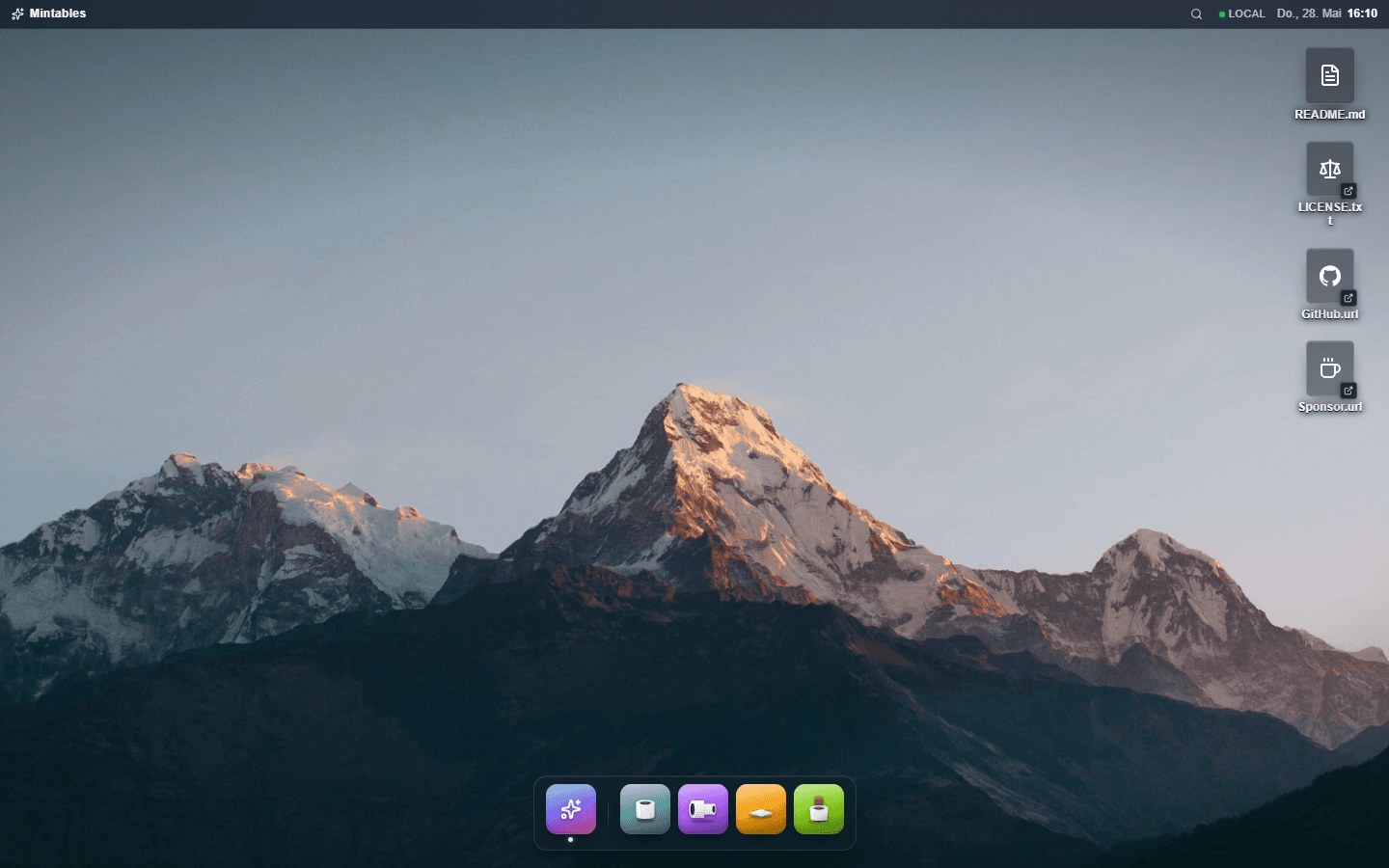
A web app that thinks it's a desktop
What changes in a React app when you stop treating it like a webpage and start treating it like a desktop environment: windows, a dock, a shared 3D canvas.

Software developer
18 min read
May 28, 2026
What changes in a React app when you stop treating it like a webpage and start treating it like a desktop environment: windows, a dock, a shared 3D canvas.
Software developer
18 min read
Most web apps in 2026 share the same shape. A sticky header at the top with brand and nav. A persistent sidebar on the left. A scrolling content area in the middle. A floating action button parked somewhere on the bottom right. They differ in palette and in product; they don't really differ in geometry.
Mintables, the small parametric 3D-part generator I have been building, had that shape too. A monorepo of browser-based generators (tubes, adapters, dividers, leg caps): you measure a part you need, plug the numbers in, watch the live preview, download an STL. The first version was a tidy Material app. Sidebar of controls, big preview area, breadcrumb header, a home page with hero copy and feature tiles. Everything worked. Nothing felt like anything in particular.
Then I tried a different instinct: treat the app like a desktop, not a webpage.
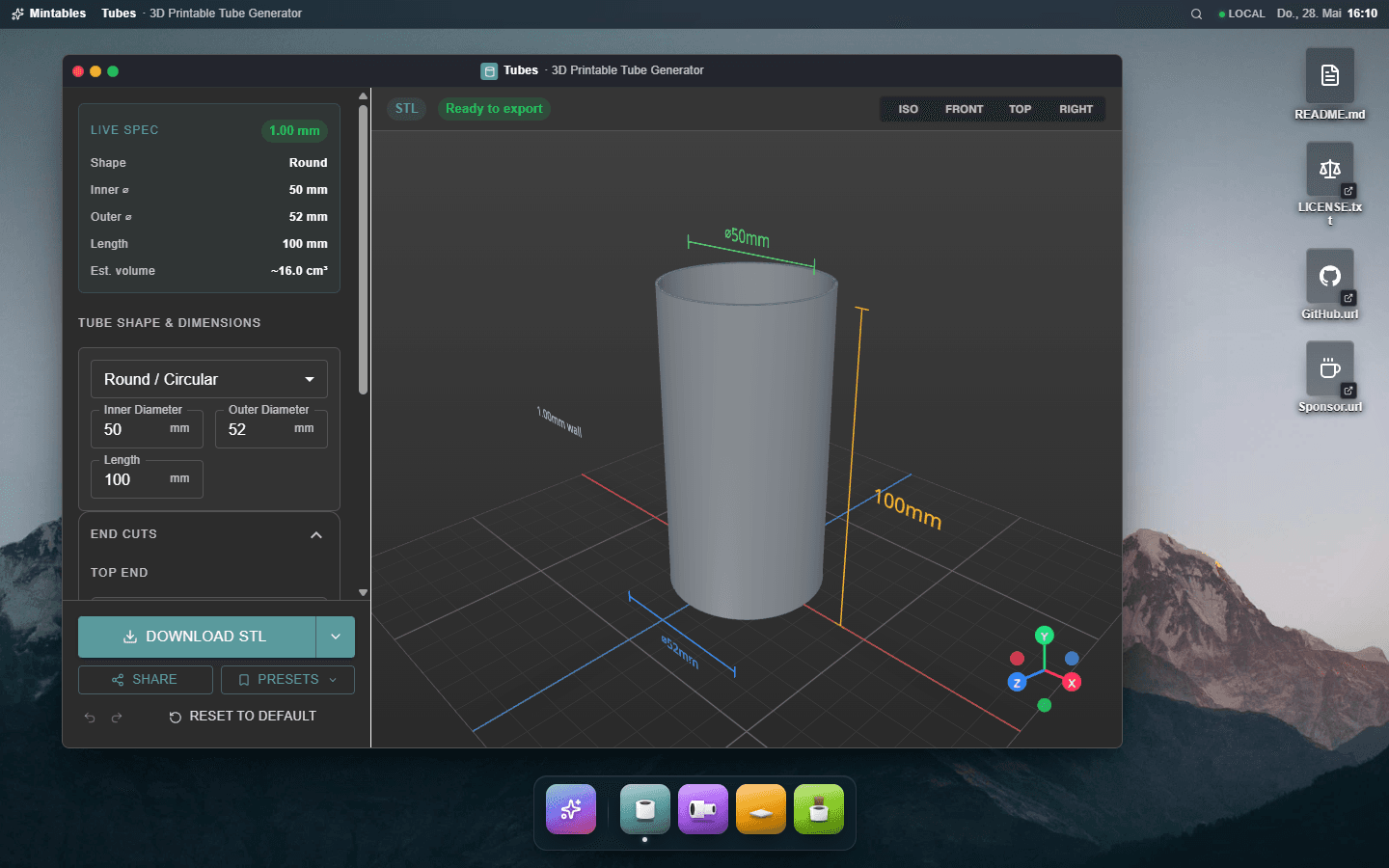
The home page is gone. The marketing copy is gone. The hero is gone. To use a generator you open it like an app: it appears as a draggable, resizable window over the wallpaper. To revisit a previous export you open the Downloads folder. To switch apps you press Cmd-K and type the name. The metaphor shifts from "browse a site" to "use a desktop."
This post is the wiring that conversion needed. Some of the lessons are aesthetic. Most are technical. There is a moment in every UI project where you trade well-trodden web patterns for something less ergonomic to the framework, and you have to figure out the plumbing underneath. The plumbing is what I want to share.
The biggest mental shift was deciding where a window's identity lives. On the web, the URL is authoritative. /generators/tubes IS the tubes view. Routing systems treat it that way. Open the URL, render the view. Close the view, leave the URL.
A desktop does not work like that. Windows have their own lifecycle. You can have three open at once, on three different routes. You can minimize one and the URL does not follow. You can focus a background window by clicking it, and the URL should update to reflect what is on top. Routes are observers, not owners.
So in Mintables the window manager lives in React state, not in the URL.
tsexport type WindowPayload =| { kind: "generator"; generatorId: string }| { kind: "folder"; folderId: FolderId };export interface OpenWindow {/** Stable id derived from payload. */id: string;payload: WindowPayload;state: "normal" | "minimized" | "maximized";x: number;y: number;w: number;h: number;z: number;}export interface WindowManagerState {windows: OpenWindow[];focusedId: string | null;nextZ: number;}
A reducer handles OPEN, CLOSE, FOCUS, MINIMIZE, RESTORE, MAXIMIZE_TOGGLE, MOVE, RESIZE, and SET_BOUNDS. Routes become thin shims. The /generators/tubes route renders null and dispatches openWindow({ kind: "generator", generatorId: "tubes" }) on mount. The route does not own the window's content. The window manager does.
The clever bit is the inverse direction: the focused window's path is mirrored back to the URL, so deep linking and back-button still work.
tsfunction useFocusUrlSync(focusedWindow: OpenWindow | null) {const router = useRouter();const pathname = usePathname();const pathnameRef = useRef(pathname);pathnameRef.current = pathname;const target = focusedWindow ? pathForPayload(focusedWindow.payload) : "/";useEffect(() => {if (target !== pathnameRef.current) router.replace(target);}, [target, router]);}
That pathnameRef is one of those gotchas you only find by hitting it. When the user navigates from /generators/tubes to /folders/downloads, the pathname updates immediately, but the new route's shim has not dispatched its openWindow effect yet. If useFocusUrlSync reacted to the pathname change, it would see the new pathname plus the still-stale focused window and replace right back to the old URL, stealing focus from the just-opened window. Reading pathname through a ref lets us check "did we already match?" without depending on it. Took me an afternoon to figure out why navigating to Downloads kept bouncing back to Tubes.
A second decision worth calling out is app-instance behavior. The window id is derived from the payload, not generated per click:
tsexport function windowIdOf(payload: WindowPayload): string {if (payload.kind === "generator") return `generator:${payload.generatorId}`;return "folder";}
Opening Tubes twice does not spawn two Tubes windows. It focuses the one that already exists. That is how macOS apps work. Both folder kinds share a single id on purpose: open Downloads while Presets is on screen, and the same folder window navigates to the new folder. Same metaphor as Finder.
Each generator window has its own accent color, its own dock tile gradient, its own custom SVG illustration. The window's top edge has an accent highlight line that brightens when focused. Pure trim, the kind of visual register that signals "this is being treated like a real thing." But the trim is not the hard part. The hard part is making the window drag feel right.
The instinct on the web is to put bounds in React state and rerender on every pointer move. That works for a single window with no expensive children. With four windows open, each containing a live 3D preview, it is a slideshow. React reconciliation costs catch up fast.
The fix is to tell React nothing during the drag. Write transform directly to the DOM. React only learns the result on pointerup.
tsconst handleTitleBarPointerMove = (e: ReactPointerEvent<HTMLDivElement>) => {const drag = dragRef.current;if (drag?.pointerId !== e.pointerId) return;const targetX = drag.startX + (e.clientX - drag.startClientX);const targetY = drag.startY + (e.clientY - drag.startClientY);const clamped = clamp(targetX, targetY, bounds.w, bounds.h);drag.lastX = clamped.x;drag.lastY = clamped.y;const el = winRef.current;if (el) {el.style.transform = `translate3d(${clamped.x}px, ${clamped.y}px, 0) ${phaseTransform[phase]}`;}invalidatePreview();};const endDrag = (e: ReactPointerEvent<HTMLDivElement>) => {const drag = dragRef.current;if (drag?.pointerId !== e.pointerId) return;onBoundsCommit(drag.lastX, drag.lastY, bounds.w, bounds.h);dragRef.current = null;};
The reducer dispatch fires once, at the end of the gesture. The other eighty frames are pure GPU transform. Cleanup is done in a useLayoutEffect that strips the inline transform once the new bounds have committed to state, so the next render takes over without flicker.
That invalidatePreview() call is the tax for sharing a single 3D canvas across all windows, which is the next section. The canvas runs in demand mode, so when the drag bypasses React, the canvas would not know to redraw. The function dispatches a custom event; a bridge component inside the Canvas listens and pokes R3F's invalidate().
There is a similar pattern for resize handles on every edge and every corner. Eight handles total, all using the same "write transform during, commit on release" approach. The cursor never feels behind.
Here is a problem I did not expect: browsers cap simultaneous WebGL contexts.
The number varies by browser, but Chromium often draws the line around eight or sixteen. Hit it, and the browser silently drops the oldest context. Each lost context turns its <canvas> black and freezes its content. There is no error. The GPU just stops talking to you.
Mintables is multi-window. Each window has a 3D preview. The naive approach is one <Canvas> per window. The naive approach fails: open and close generators a dozen times, and the preview canvases start blanking out one by one as old contexts get evicted. The fix is structural. One canvas for the entire app, scissor-painted into each window's reserved div.
R3F plus drei makes this practical with the <View> API. Each window's PreviewPanel renders a tracked div containing a <View> with its scene. A single global Canvas at the page root mounts <View.Port />, which composites every tracked view onto itself.
tsxexport function PreviewStage({ containerRef }: PreviewStageProps) {return (<CanvaseventSource={containerRef as EventSourceRef}eventPrefix="client"dpr={[1, 2]}frameloop="demand"gl={{ antialias: true }}style={{position: "fixed",inset: 0,pointerEvents: "none",zIndex: 1150,}}><InvalidateBridge /><View.Port /></Canvas>);}
The canvas sits above the windows but below the dock. It is pointer-events: none, so it does not swallow clicks. drei's <View> routes pointer events from each tracked div into the right scene. The fixed positioning means the canvas covers the whole viewport, but each <View>'s scissor rect is updated every frame from its tracked div's getBoundingClientRect(), so the scenes only paint inside their windows.
frameloop="demand" is what makes this affordable. The canvas is idle when nothing changes. Once idle, dragging a window is free of CPU work. The exception is when a window changes shape (drag, resize, minimize, restore) and the scissor needs to follow. Those moments call invalidatePreview() so the canvas paints one more frame and the View re-measures its rect.
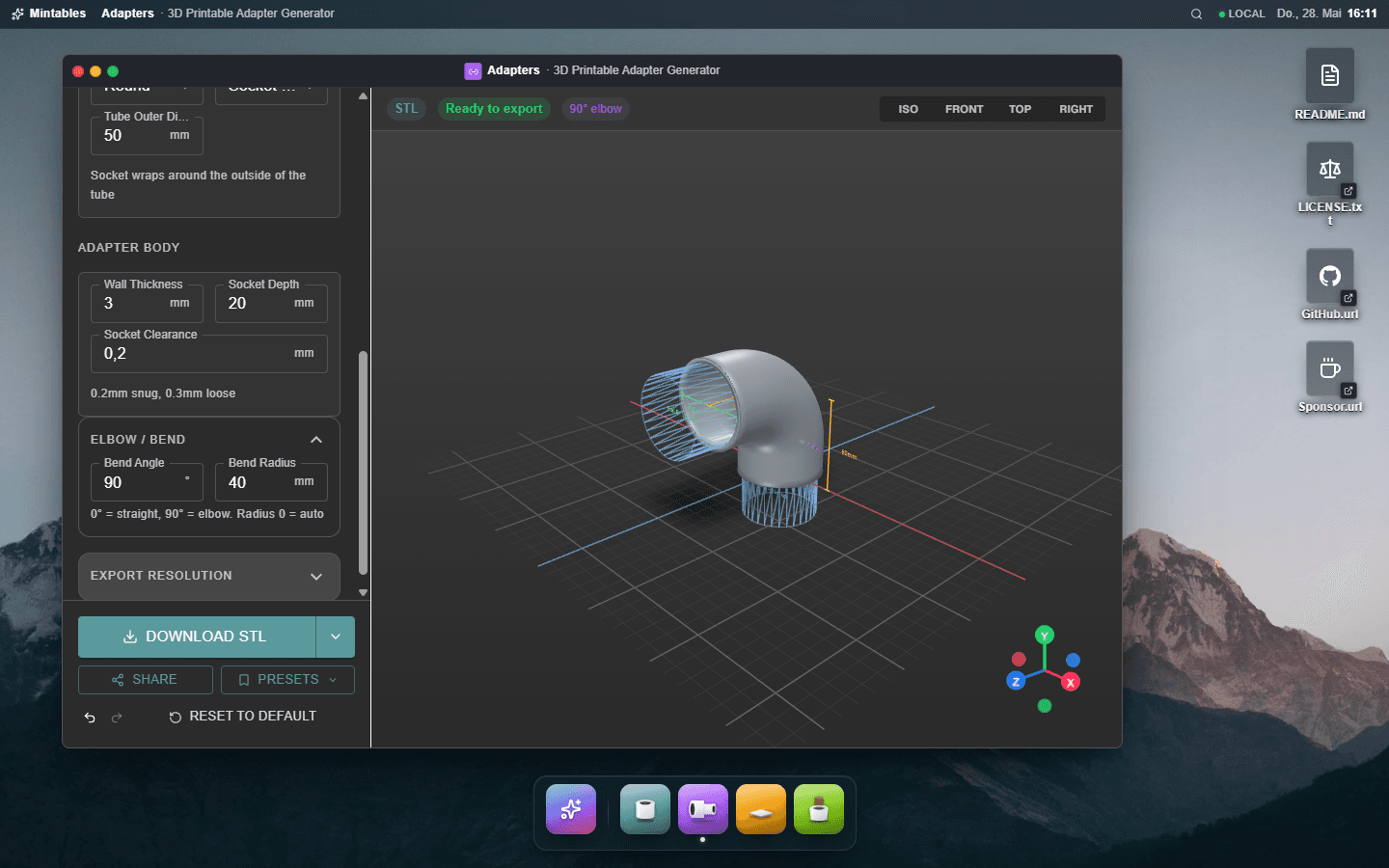
The same trick scales to as many windows as the user is willing to open. There is still exactly one WebGL context behind the scenes.
Real desktops do not show you furniture that has no purpose. A Documents folder with nothing in it is hidden until you save your first file. Mintables follows that rule: the Downloads and Presets folders only exist on the desktop after you have produced something to put in them.
The implementation is small. The storage modules dispatch a custom event on every write.
tsconst CHANGE_EVENT = "mintables:downloads-changed";function emitChange(): void {if (typeof window === "undefined") return;window.dispatchEvent(new CustomEvent(CHANGE_EVENT));}export function recordDownload(/* ... */): DownloadEntry {// write to localStorage ...writeDownloads(next);emitChange();return entry;}export const DOWNLOADS_CHANGED_EVENT = CHANGE_EVENT;
A tiny hook listens for it, plus the native storage event for cross-tab updates.
tsfunction useStorageFlag(read: () => boolean, changeEvent: string): boolean {const [flag, setFlag] = useState(false);useEffect(() => {const sync = () => {setFlag(read());};sync();window.addEventListener(changeEvent, sync);window.addEventListener("storage", sync);return () => {window.removeEventListener(changeEvent, sync);window.removeEventListener("storage", sync);};}, [read, changeEvent]);return flag;}
The desktop hub uses this to drive its conditional icons. No mutex with the route system, no derived state in a context, no zustand store. Two browser events and a hook. The icon appears the moment you finish your first download, with no reload.
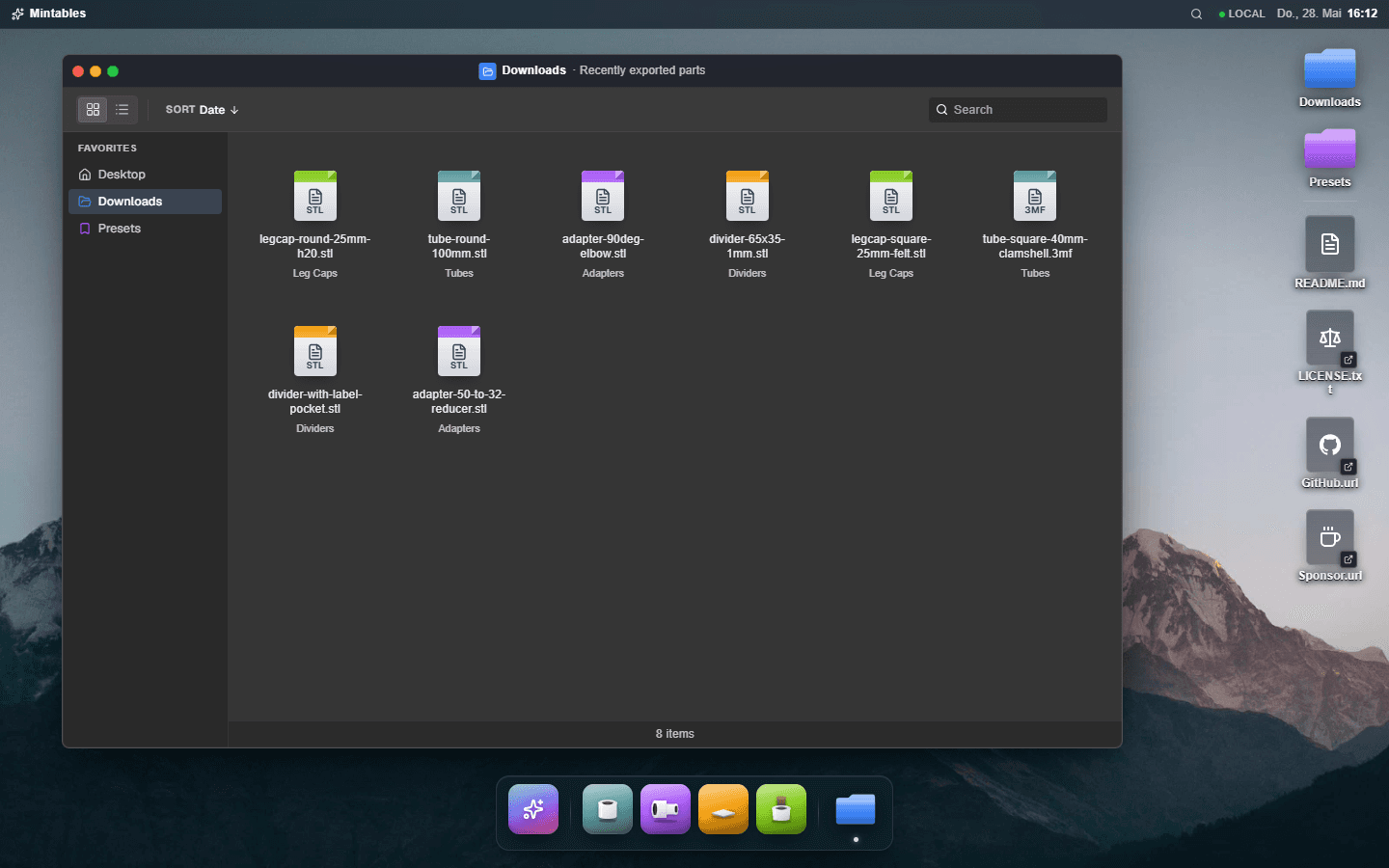
The folder windows themselves use one shared FileExplorer component. It is item-agnostic: it takes an items array and an actions array, handles selection (single click, Shift-click range, Cmd-click toggle), context menus, keyboard shortcuts (Enter to open, F2 to rename, Delete to delete, Cmd-A to select all), search, sort, and view toggle. Every behavior I would reach for in Finder is there. Adding a third folder type would be one new items provider.
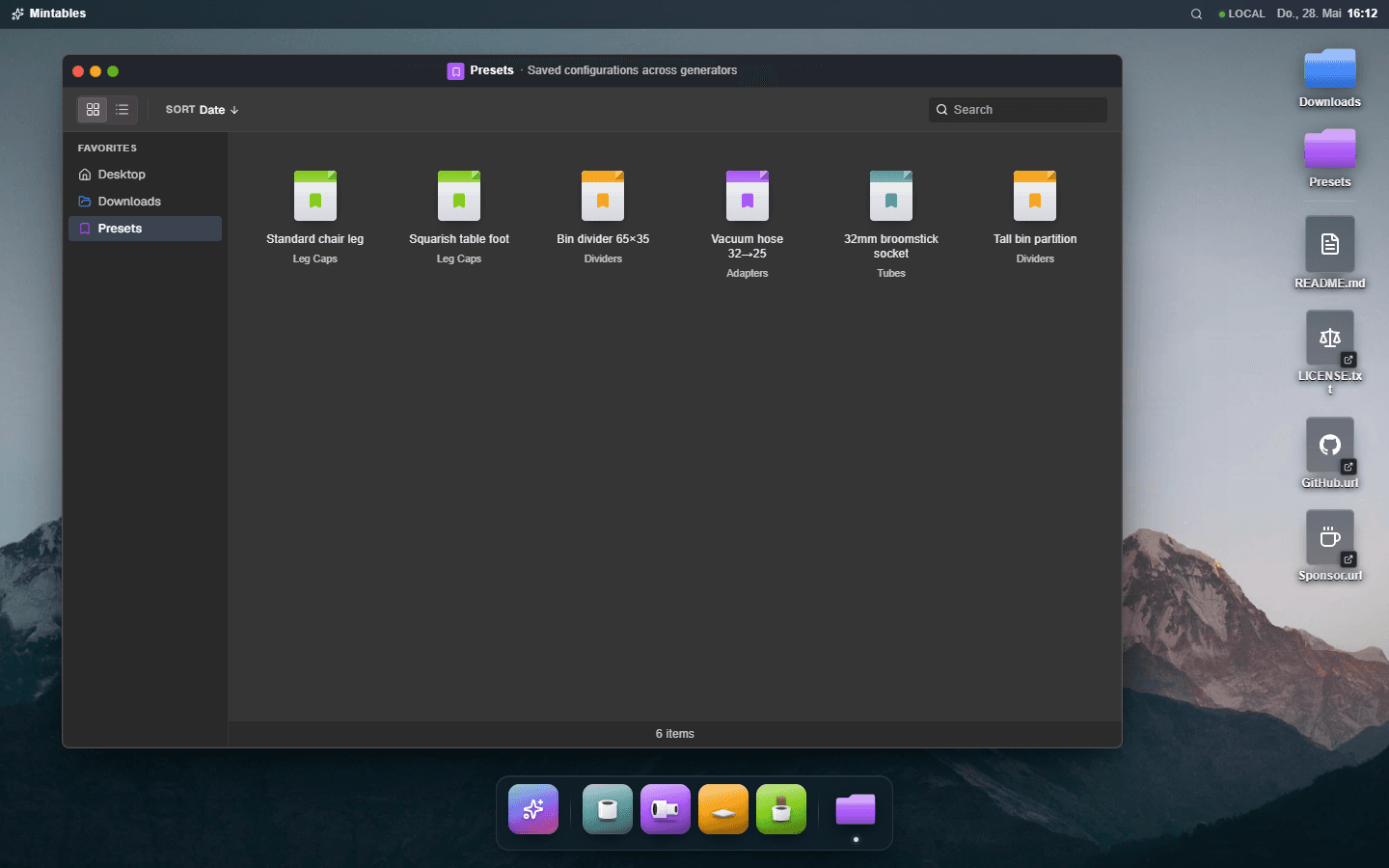
A non-obvious bonus: state-earned UI cuts down on empty-state design work. Empty states are an entire surface area on most apps. The Mintables desktop does not have those, because the surface whose empty state you would be designing is not there yet.
A dock works for mice. For keyboards you want something else. macOS solves it with Spotlight: Cmd+Space opens a global search field, you type a few letters, you hit Enter, the result happens. Two seconds, zero mouse moves. Mintables ports the idea. Cmd-K (Ctrl-K elsewhere) opens a frosted-glass palette over everything that fuzzy-searches across generators, presets, and downloads in one ranked list.
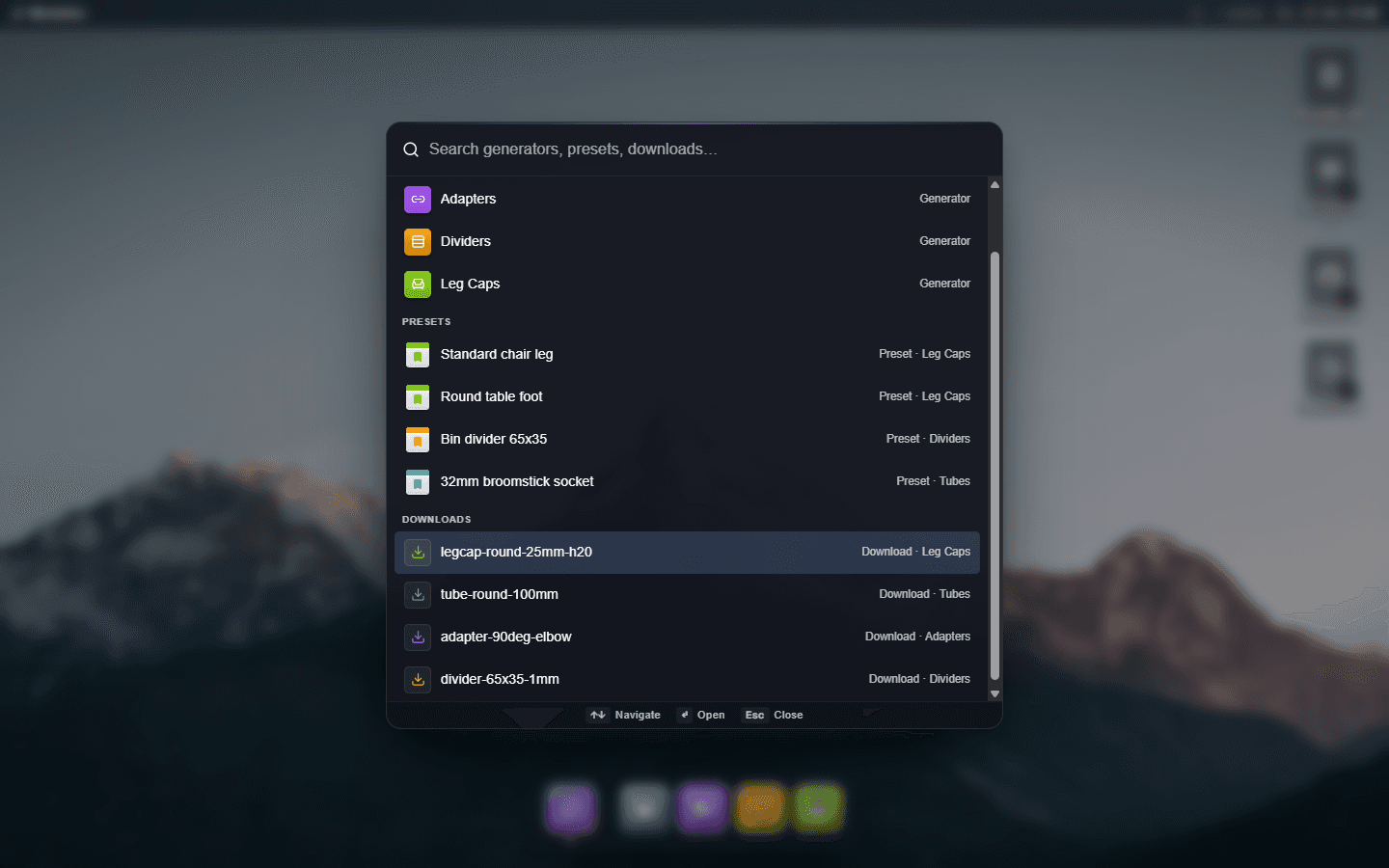
Two pieces of the implementation are worth showing. The first is the global keyboard handler. It lives inside the Spotlight component itself rather than in a separate shortcut registry, because Spotlight is the only feature that needs it and locality wins over premature centralization.
tsuseEffect(() => {const onKey = (e: KeyboardEvent) => {const isCmdK = (e.metaKey || e.ctrlKey) && e.key.toLowerCase() === "k";if (!isCmdK) return;if (!open) {const t = e.target as HTMLElement | null;const inField = t && (t.tagName === "INPUT" || t.tagName === "TEXTAREA");if (inField) return;e.preventDefault();handleOpen();return;}e.preventDefault();handleClose();};window.addEventListener("keydown", onKey);return () => {window.removeEventListener("keydown", onKey);};}, [open, handleOpen, handleClose]);
The "in field" bail-out is the same trick the broader window-shortcuts listener uses: if the event target is an <input> or <textarea>, leave it alone so the user can type a literal K. The exception is that Cmd-K while focus is inside Spotlight's own input still closes the palette. Toggling off is more useful than letting K land in the search field.
The second piece is the activation pattern. Every result kind reuses one primitive.
tsconst activate = useCallback((result: Result) => {if (result.kind === "generator") {openWindow({kind: "generator",generatorId: result.generator.id,});handleClose();return;}if (result.kind === "preset") {const gen = result.generator;if (!gen) {handleClose();return;}const target = new URL(buildShareUrl(gen.id, result.preset.config));target.searchParams.set("preset", result.preset.id);router.push(target.pathname + target.search);handleClose();return;}// Download: re-open the generator with the recorded config.const gen = result.generator;if (!gen) {handleClose();return;}const target = new URL(buildShareUrl(gen.id, result.download.config));router.push(target.pathname + target.search);handleClose();},[openWindow, router, handleClose],);
Generators activate by calling openWindow(...), the exact same primitive a dock click uses. Presets and downloads navigate to a config-encoded URL; the route shim at /generators/<id> picks up the ?config=… query and dispatches its own openWindow on mount. The shortest path from "I typed three letters" to "the window I wanted is on top" runs through the same plumbing as every other entry point.
The empty-query state is a small lesson too. With no query, Spotlight shows all generators plus the five most-recent presets and the five most-recent downloads. So it doubles as a "what did I touch recently" surface, subsuming the Downloads folder and the Presets menu when you just want to get back to something.
One small bonus: a SPOTLIGHT_OPEN_EVENT custom event lets any other component (the search icon in the menu bar, a "Find" button somewhere on a page) open the palette without prop drilling. Same pattern as the storage-change events from the previous section. Browser events make excellent inter-component glue when the alternative is wiring a callback through three layers of context.
Real operating systems spend most of their motion budget on three things: opening, closing, and minimizing. Each animation is a small piece of evidence that what just happened was a real action with a real destination.
The minimize animation is the one I am most proud of. macOS has the "genie" effect: the window scales down and slides into its dock tile. The motion plus the destination together convey "this window is not gone, it is parked over there." Without the destination, minimize looks like a crash.
In Mintables, before the animation plays, we measure the dock tile's DOM rect and set the delta as CSS custom properties on the window.
tsconst handleMinimize = () => {const win = winRef.current;if (win) {const dockTile = document.querySelector(`nav[aria-label="App dock"] [aria-label="${title}"]`,);if (dockTile) {const dockRect = dockTile.getBoundingClientRect();const winRect = win.getBoundingClientRect();const dx =dockRect.left + dockRect.width / 2 - (winRect.left + winRect.width / 2);const dy =dockRect.top + dockRect.height / 2 - (winRect.top + winRect.height / 2);win.style.setProperty("--min-dx", `${dx.toFixed(0)}px`);win.style.setProperty("--min-dy", `${dy.toFixed(0)}px`);}}setPhase("minimizing");window.setTimeout(() => {onMinimize();setPhase("open");}, 380);};
The CSS transition picks up var(--min-dx) and var(--min-dy) from the minimizing phase.
tsconst phaseTransform: Record<LifecyclePhase, string> = {opening: "translateY(8px) scale(0.985)",open: "scale(1)",closing: "translateY(-4px) scale(0.97)",minimizing:"translate3d(var(--min-dx, 0), var(--min-dy, 24vh), 0) scale(0.06)",};
The window stays mounted while minimized, just rendered at scale 0.06 with opacity 0 and pointer events off. That preserves all of the shell's internal state (preview camera position, undo stack, edited config) so restoring is instant. Restoring runs the same animation in reverse.
Make every animation interruptible
If the user clicks Close mid-open, the close has to take over from wherever
the open got to. The phase enum (opening | open | closing | minimizing) plus
CSS transitions on transform and opacity give you that for free: the next
phase's target transform replaces the current one mid-flight and CSS
interpolates from current to new. You never write logic for "what if the
animation is already running." Phase changes are atomic.
The wallpaper has cursor parallax (a few pixels of shift on mousemove) plus a slow fade-in on first paint. Dock tiles lift on hover. The little stuff. None of it is novel. Together, it adds up to a UI that feels weighted, like clicking it touches something real.
Reframing a web app as a desktop is not free.
You give up the page metaphor's main affordances. Deep scrolling is gone (the work area is a fixed viewport). Hero pages and marketing copy do not have a home. External SEO of internal views weakens because every "page" is a window opened on top of one shell. The first impression for a first-time user is "what am I looking at" rather than "ah, a website."
You also write more code. The window manager, the work-area arithmetic, the URL sync, the shared canvas plumbing, the focus model, the keyboard shortcuts, the dock indicator state, the genie animation, the file explorer with selection and rename. None of it ships in a router or a UI library. Every one of those features has a hand-rolled implementation behind it.
What you get back is the inverse of what most web UIs surrender by default. Real multitasking: a Tubes window and a Downloads window open at once, comparing the model in front of you to a past export. Real focus: a single window owns input until you click somewhere else. Real keyboard ergonomics: Cmd+1..9 jumps to apps, Cmd+W closes the front window, Cmd+M minimizes, Cmd+K opens Spotlight, all wired through one global keydown listener that bails on inputs and contenteditables. A real sense of place: when the user comes back tomorrow, the desktop is where they left it, and the cap they were sizing yesterday is open, ready to keep editing.
The biggest qualitative shift is that the user stops navigating the app and starts inhabiting it. They learn where things are once and then act, instead of clicking through a path. Modal interruptions stop existing. Side rails stop existing. A large part of the surface area you would have spent Material polish on stops existing.
The hardest part is not the window manager or the shared canvas. The hardest part is resisting the sidebar-and-content shape every web app reaches for by default.
The parametric 3D generator app this article describes. The window manager, shared R3F canvas, and FileExplorer all live in packages/shared.
The React Three Fiber portal primitive that makes one canvas serving many tracked views practical.
The WebGL spec gives implementations latitude on context counts. Chromium's eviction behavior is the practical constraint.